🔐
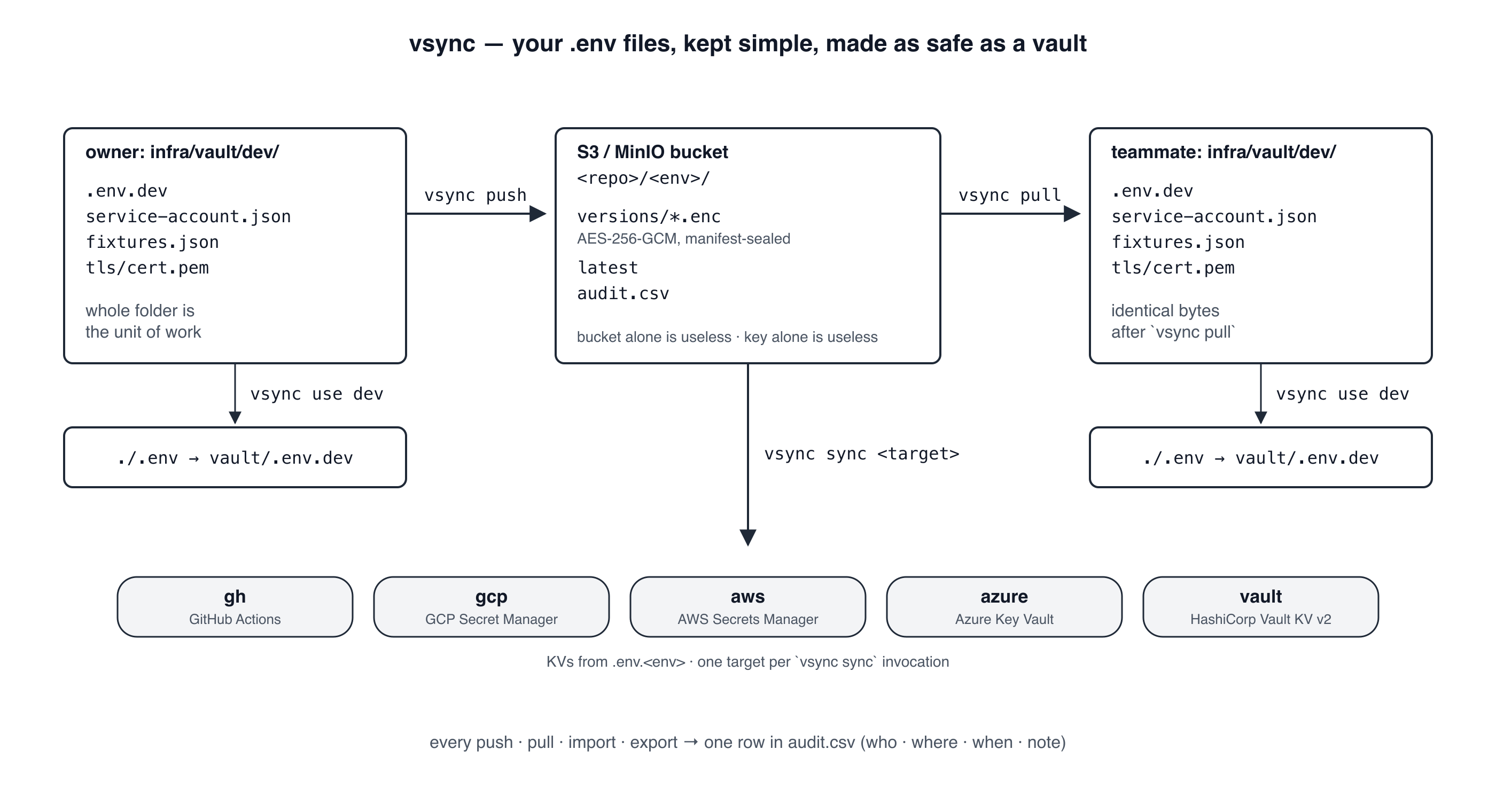
Encrypted at rest, sealed in transit
AES-256-GCM bundles on any S3-compatible bucket (AWS, Hetzner, MinIO, R2, B2). Per-machine AES key in the OS keychain. The bucket alone is useless; the key alone is useless. Both halves required.
One encrypted vault for your environment secrets — shared across your team, mirrored to GH / GCP / AWS / Azure / Vault, audited every time someone touches it.
<div class="vsync-flow-wrap">
</div>
bun install -g @muthuishere/vsync     # or:  npm install -g @muthuishere/vsync
vsync --help
Requires Bun ≥ 1.2.21 on PATH (for Bun.secrets). Don't want to install? bunx @muthuishere/vsync <subcommand> works too.
# One-time per machine — name your S3 bucket once, reuse across projects
vsync profile add hetzner-personal          # endpoint, bucket, IAM key

# Per repo + env
vsync init dev --profile=hetzner-personal   # generate per-(repo, env) key + config
echo "DB_URL=postgres://…" > infra/vault/dev/.env.dev
vsync push dev                              # encrypt + upload to S3

vsync export dev                            # → ./<repo>-dev.share + passphrase
# Hand the file + passphrase to teammate on different channels.

# Teammate:
vsync import dev ./<repo>-dev.share         # config + key into keychain
vsync pull dev                              # decrypt + unpack vault folder
vsync use dev                               # ./.env → infra/vault/dev/.env.dev

# Daily:
vsync push dev                              # I edited a secret
vsync pull dev                              # what did the team change?
vsync sync dev gh                           # push .env.dev keys to GitHub Actions
vsync audit dev                             # who touched what, when
vsync status                                # what's set up on this machine

# Production app — mint a bootstrap token for the runtime libs
vsync runtime-token --env=prod              # → vsync-cfg-v1:H4sIAAAA...
# Paste into your platform's secret store as VSYNC_CONFIG.